
How to Plan Your Week Without Overloading It
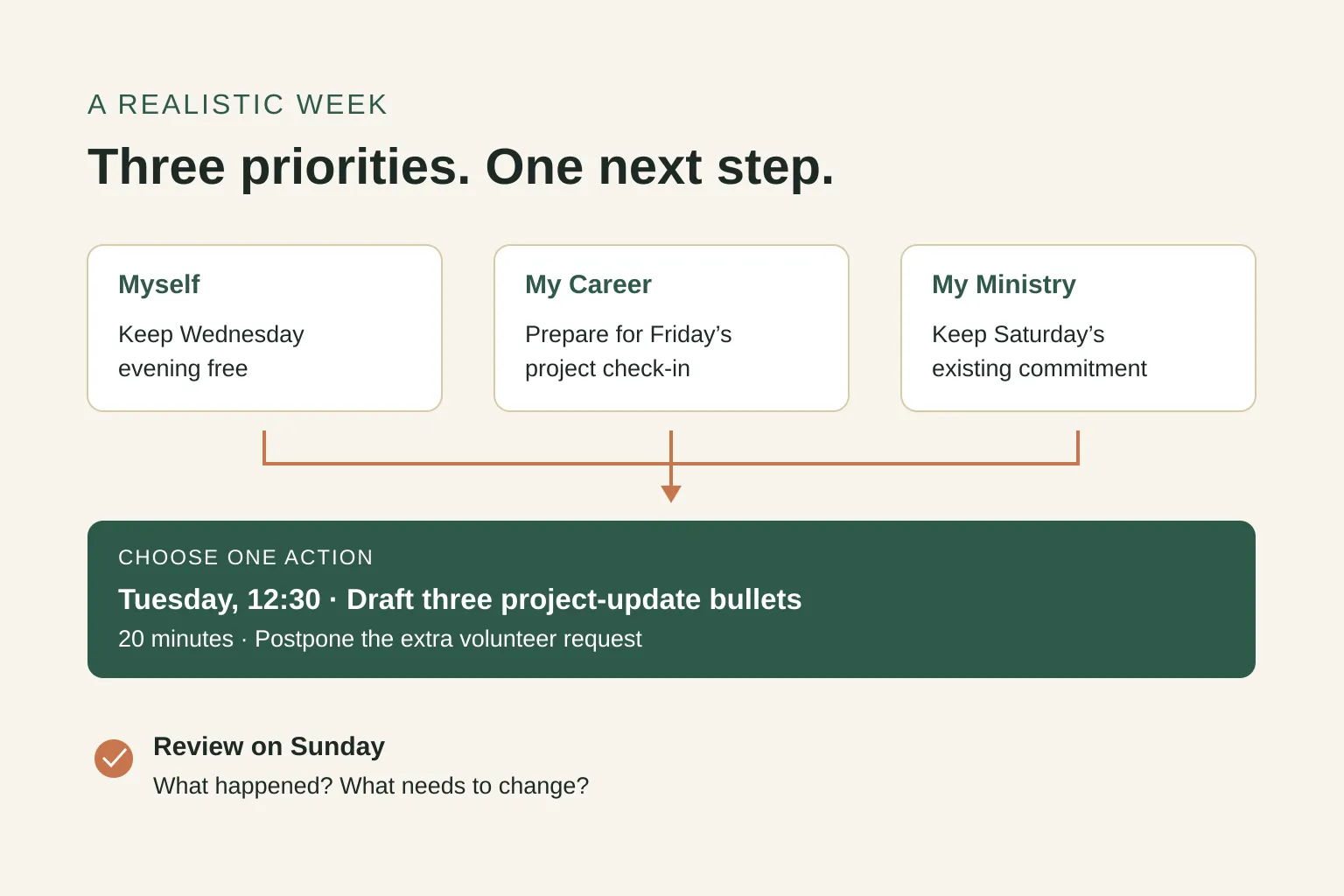
To plan your week, start with commitments already on your calendar, name what matters across your personal life, work and ministry, and choose one manageable next action. Give that action a time or trigger, decide what you'll protect or postpone, and set a review time. Keep your existing responsibilities on the calendar; this approach adds a small focus for the week rather than a task for every goal.
How to plan your week in five steps
Use a sheet of paper and the calendar you already rely on. If you want a small starting limit, try spending 15 minutes on the steps below; it's a suggested planning window, not a requirement to finish that fast.
- Mark what is already committed. Include work hours, appointments, travel, caregiving and existing church or community commitments. Account for preparation and the journey, not just the event itself.
- Name one priority in each life area. Write one sentence for Myself, My Career and My Ministry. A priority can be maintaining something that works, protecting rest or reducing a commitment. Ministry can include purpose, passions, creative pursuits and community service.
- Choose one next action. Ask which priority needs attention this week and what small step would move it forward. You can notice all three areas without adding a new task to each.
- Place the action and name its trade-off. Write when you'll start, how long you'll allow and what “done” looks like. Then name something you'll protect or postpone so the action fits.
- Set a review time. Choose a short check-in later in the week. Ask what happened, what effect it had across the three areas and what needs adjusting.
If prayer or quiet reflection is part of your practice, make room for it as you choose your priorities. Your plan can reflect your faith without needing to record or share private beliefs.
Start with capacity, before adding goals
An empty calendar slot may already be needed for meals, household tasks, recovery or time with someone you care for. Before treating a gap as available, ask: “What usually happens here that I haven't written down?”
If your next action only fits by moving something important, make that choice visible. You might postpone a nonurgent errand, ask someone to share a task or make the action smaller. Avoid building a plan that quietly depends on every meeting ending early and every journey going smoothly.
When the week is already full, choose an action that reduces pressure: clarify a deadline, ask for help or decline an additional commitment. Maintaining an existing responsibility can be the week's priority.
Turn a broad priority into a finishable action
A priority explains what matters. An action explains what you'll do next. “Grow in my career” may matter deeply, but it doesn't tell you what to start on Tuesday.
| Broad priority | A next action you can place in the week |
|---|---|
| Make room for myself | Check the calendar tonight and keep one evening free of new commitments. |
| Prepare for a project conversation | Draft three update bullets during a 20-minute work block. |
| Serve reliably | Confirm the time and task for the community shift already agreed to. |
| Return to a creative pursuit | Put the materials out and spend 15 minutes on one unfinished piece. |
Those durations are starting suggestions. Use your experience of the task to choose a realistic allowance. If “done” still means completing a whole project, narrow the action to the next decision, message or draft.
A useful sentence to copy is:
On [day], at/after [time or trigger], I will [specific action] for [time allowance]. Done means [visible result]. I will protect [important commitment] and postpone [optional task].
A worked week: prepare for a check-in, protect an evening
Say Jordan works weekdays, has a Thursday evening family commitment and has already agreed to help at a Saturday community event. A project check-in is due on Friday. Jordan would also like some uncommitted time at home.
On Sunday, Jordan writes:
- Myself: Keep Wednesday evening free.
- My Career: Be ready to explain the project's progress on Friday.
- My Ministry: Keep Saturday's agreed commitment without taking on another role.
Jordan chooses one new action: draft three project-update bullets on Tuesday at 12:30, during an available 20-minute work block. “Done” means one bullet on completed work, one on the current obstacle and one on the next step. Jordan leaves a new volunteer request unaccepted until checking capacity.
On Tuesday, Jordan opens a note and writes those three headings before adding the details. If the work block disappears, the fallback is a ten-minute outline in Thursday's available work time—not automatically taking Wednesday evening away.
At Sunday's review, suppose the outline was finished on Thursday, the Friday check-in happened, Wednesday stayed free and Saturday's event ran longer than expected. Jordan records that the action worked, but the next community event needs a larger time allowance. The adjustment for the following week is to include that extra time before agreeing to anything nearby.
The review looks at the whole week, not just whether a box was ticked.
Try Jordan's priority in your own outline
Open the free goal outline without an account. To try Jordan's week, choose My Career, enter “Be ready to explain the project's progress on Friday” in One goal that matters to you, and set Minutes available this week to 20. Select Create my outline, then replace the starter prompts with these words:
- Clarify the goal: Be ready for Friday's check-in. Done means three bullets: completed work, current obstacle and next step.
- Choose a next step: On Tuesday at 12:30, draft the three project-update bullets during a 20-minute work block. Keep Wednesday evening free and postpone accepting the extra volunteer request.
- Review and adjust: Review on Sunday: Did I draft the update? Did Wednesday stay free? Did Saturday's event need more time? Choose one adjustment for next week.
For your own priority, change the goal, life area and time first. Keep the action's shape: a visible result, a time to start, something to protect or postpone, and a review question. You only need one outline; the protected commitments and review can still cover all three life areas.
Choose Download text or Print / save PDF to keep a copy before leaving or refreshing. If you'd rather return to it in an account next week, see the free saved-plan tour; the closing section below explains how to carry and save your draft.
What if the week changes halfway through?
When a new obligation arrives, revise the plan instead of stacking it on top. Check any real deadline, then decide whether to keep, shrink, move or drop your chosen action.
- Keep it when it still matters and the time remains available.
- Shrink it when a smaller result would still help: three headings instead of a polished update.
- Move it when another realistic slot exists. Check what that move would displace.
- Drop it for this week when something more important needs the capacity. Tell anyone affected if a commitment or deadline changes.
You don't need to recreate the entire week because Tuesday went differently. Update the part that changed and look for any knock-on effect.
Notice these signs that the plan is too full
Every priority has become several new tasks. Keep the priorities visible, but choose one new focus to begin with. Existing responsibilities still count as work and service.
The action only fits by taking time you meant to protect. Name the trade-off before agreeing to it. Shrinking the action may be a better choice than cancelling rest or time with family by default.
The same action moves forward every week. Ask whether it's too large, depends on another person or no longer matters. Replace “finish the project” with “ask for the missing information” if that's the actual next step.
The review becomes a list of failures. Write what happened and why before choosing an adjustment. “The shift ran late; leave more travel time next week” gives you something to change. “Try harder” doesn't.
Keep a copy for your weekly review
The five free planner pages are also in the book; the longer, more in-depth workbook is a separate resource. Use the monthly-goals page to pick a focus, look at the filled-in example, then use the blank weekly-to-do page, weekly planner and day planner to decide what to do and when.
365 My Life's free weekly planning worksheet gives you space for priorities across Myself, My Career and My Ministry, one action and a later review. It's a one-page printable with no signup or payment; you can keep the completed sheet private.
Prefer to type? Try the editable goal sample without an account, then print or download your outline before leaving—the no-account version clears when you leave or refresh. If you want to return to the same plan, choose its optional free private account route, keep the tab open through sign-in, and explicitly save the draft in your account.
At your review time, sign in to return to your saved plan, edit it and keep a dated weekly review alongside it so you can see what changed. Or use the free weekly review without an account with your own copy of the plan; print or download that review before leaving, too.